Arduino (17) Board Manager ― 2016年05月07日
Arduino IDE のバージョンが 1.6.8 になっても、我が Duemilanove 1284p を追加した環境 (sketchbook/hardware) は、そのまま使えるようだ。
しかしながら、コンパイル時に warning が出るようになった。
Warning: platform.txt from core 'Arduino ATmega1284p Boards' contains deprecated compiler.path={runtime.ide.path}/hardware/tools/avr/bin/, automatically converted to compiler.path={runtime.tools.avr-gcc.path}/bin/. Consider upgrading this core.
Warning: platform.txt from core 'Arduino ATmega1284p Boards' contains deprecated tools.avrdude.cmd.path={runtime.ide.path}/hardware/tools/avr/bin/avrdude, automatically converted to tools.avrdude.cmd.path={path}/bin/avrdude. Consider upgrading this core.
Warning: platform.txt from core 'Arduino ATmega1284p Boards' contains deprecated tools.avrdude.config.path={runtime.ide.path}/hardware/tools/avr/etc/avrdude.conf, automatically converted to tools.avrdude.config.path={path}/etc/avrdude.conf. Consider upgrading this core.
Warning: platform.txt from core 'Arduino ATmega1284p Boards' contains deprecated recipe.ar.pattern="{compiler.path}{compiler.ar.cmd}" {compiler.ar.flags} {compiler.ar.extra_flags} "{build.path}/{archive_file}" "{object_file}", automatically converted to recipe.ar.pattern="{compiler.path}{compiler.ar.cmd}" {compiler.ar.flags} {compiler.ar.extra_flags} "{archive_file_path}" "{object_file}". Consider upgrading this core.
Warning に示されているように、platform.txt の各パラメータを修正すればよいのだが、ver.1.6.x への対応方法が
https://github.com/arduino/Arduino/wiki/Arduino-Hardware-Cores-migration-guide-from-1.0-to-1.6
に記載されているので、手順にしたがって、フォルダの構成、board.txt, platform.txt を修正する。
せっかくなので、Boards Manager にも対応させる。
製品ではないし、ほかにはないのだから、そのままの環境で使っていてもいいのだが、標準から離れてガラパゴス化してしまうのもつまらないだろう。
いろいろと調べてみると、ボードごとの package ファイルとそれら情報をまとめたテキスト・ファイル (JSON フォーマット) を用意する必要がある (package_atmega1284p-1.0.0_index.json)。
https://github.com/arduino/Arduino/wiki/Arduino-IDE-1.6.x-package_index.json-format-specification
にしたがって作成する。
example があるので、それを元に編集すれば簡単だ。
package ファイルは、これまで使っていた Duemilanove 1284p 用のフォルダ sketchbook/hardware/ATmega1284p から再構築すれば良さそうだ。
出来上がったフォルダ/ファイル一式を archive にまとめ (package_atmega1284p-1.0.0.zip)、checksum を計算する (sha256sum)。
sketchbook/hardware を削除し、Arduino IDE を再起動して、Pro Micro のときと同様の手順で Duemilanove 1284p を追加する。
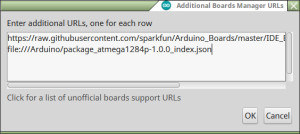
Boards Manager のファイル (package_atmega1284p-1.0.0_index.json) を URL で設定 (追加) し、
しかしながら、コンパイル時に warning が出るようになった。
Warning: platform.txt from core 'Arduino ATmega1284p Boards' contains deprecated compiler.path={runtime.ide.path}/hardware/tools/avr/bin/, automatically converted to compiler.path={runtime.tools.avr-gcc.path}/bin/. Consider upgrading this core.
Warning: platform.txt from core 'Arduino ATmega1284p Boards' contains deprecated tools.avrdude.cmd.path={runtime.ide.path}/hardware/tools/avr/bin/avrdude, automatically converted to tools.avrdude.cmd.path={path}/bin/avrdude. Consider upgrading this core.
Warning: platform.txt from core 'Arduino ATmega1284p Boards' contains deprecated tools.avrdude.config.path={runtime.ide.path}/hardware/tools/avr/etc/avrdude.conf, automatically converted to tools.avrdude.config.path={path}/etc/avrdude.conf. Consider upgrading this core.
Warning: platform.txt from core 'Arduino ATmega1284p Boards' contains deprecated recipe.ar.pattern="{compiler.path}{compiler.ar.cmd}" {compiler.ar.flags} {compiler.ar.extra_flags} "{build.path}/{archive_file}" "{object_file}", automatically converted to recipe.ar.pattern="{compiler.path}{compiler.ar.cmd}" {compiler.ar.flags} {compiler.ar.extra_flags} "{archive_file_path}" "{object_file}". Consider upgrading this core.
Warning に示されているように、platform.txt の各パラメータを修正すればよいのだが、ver.1.6.x への対応方法が
https://github.com/arduino/Arduino/wiki/Arduino-Hardware-Cores-migration-guide-from-1.0-to-1.6
に記載されているので、手順にしたがって、フォルダの構成、board.txt, platform.txt を修正する。
せっかくなので、Boards Manager にも対応させる。
製品ではないし、ほかにはないのだから、そのままの環境で使っていてもいいのだが、標準から離れてガラパゴス化してしまうのもつまらないだろう。
いろいろと調べてみると、ボードごとの package ファイルとそれら情報をまとめたテキスト・ファイル (JSON フォーマット) を用意する必要がある (package_atmega1284p-1.0.0_index.json)。
https://github.com/arduino/Arduino/wiki/Arduino-IDE-1.6.x-package_index.json-format-specification
にしたがって作成する。
example があるので、それを元に編集すれば簡単だ。
package ファイルは、これまで使っていた Duemilanove 1284p 用のフォルダ sketchbook/hardware/ATmega1284p から再構築すれば良さそうだ。
出来上がったフォルダ/ファイル一式を archive にまとめ (package_atmega1284p-1.0.0.zip)、checksum を計算する (sha256sum)。
sketchbook/hardware を削除し、Arduino IDE を再起動して、Pro Micro のときと同様の手順で Duemilanove 1284p を追加する。
Boards Manager のファイル (package_atmega1284p-1.0.0_index.json) を URL で設定 (追加) し、
package をインストール、

board と port を選択して、

これまでと同じように Duemilanove 1284p が使えるようになった。
コメント
トラックバック
このエントリのトラックバックURL: http://walkingmix.asablo.jp/blog/2016/05/07/8085173/tb
※なお、送られたトラックバックはブログの管理者が確認するまで公開されません。
コメントをどうぞ
※メールアドレスとURLの入力は必須ではありません。 入力されたメールアドレスは記事に反映されず、ブログの管理者のみが参照できます。
※なお、送られたコメントはブログの管理者が確認するまで公開されません。